

- Go to Admin Console > Shield.
- Click the Information Barrier tab. Make sure you have at least 2 segments defined.
- Click Define Segment Permissions.
- For each segment relationship, click the Access drop-down menu and select:
- Can Access - to allow members of the segment on the left to access content owned by members of the segment on the right.
- Cannot Access - to prevent members of the segment on the left to access content owned by members of the segment on the right. (This creates an ethical wall).
NoteEach relationship is a one-way relationship. To define a two-way ethical wall, select Cannot Access for both of the segment relationships.
- Click Save.
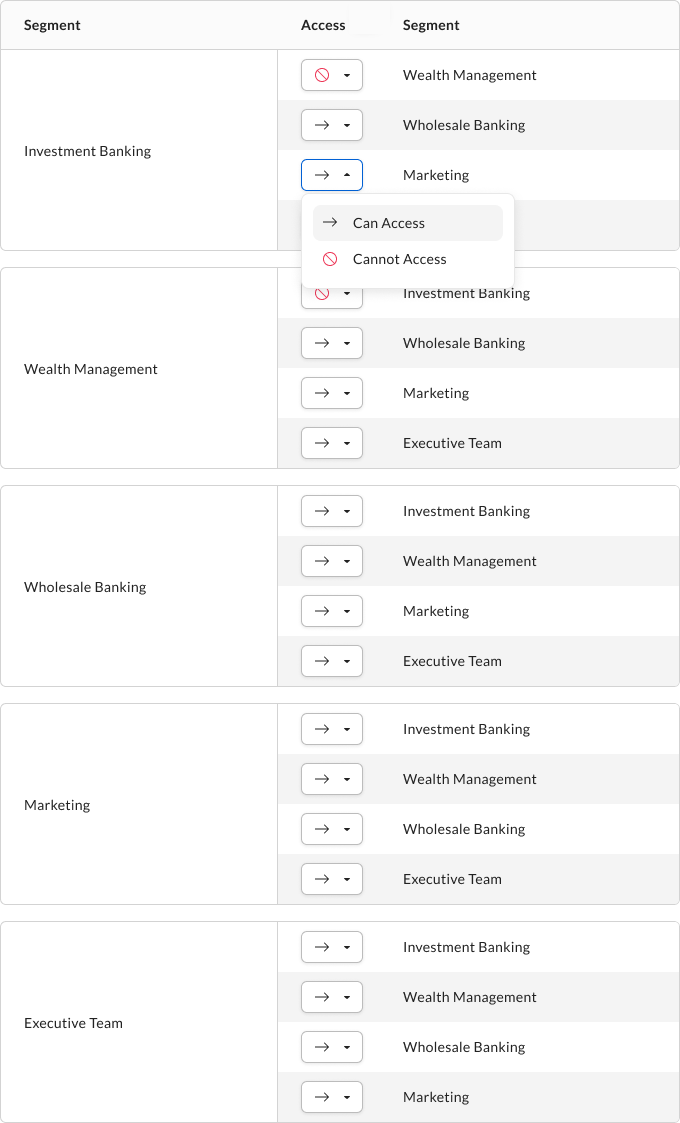
- Users in the Investment Banking segment cannot access content owned by users in the Wealth Management segment.
- Users in the Wealth Management segment cannot access content owned by users in the Investment Banking segment.