

Note: Retention polices do not retain bookmarks.
Retention Application
A retention policy specifies how retention gets applied to content in your organization. The options for how retention get applied include:- Content within specified folders
- Content with specified Classification labels
- Content with specified metadata
- All new content
What End Users See
Users can delete retained files by sending them to Trash. However, users cannot purge files from Trash until the files’ retention period has ended. Before that time, users can also restore files from Trash to their original location. If the original location has been deleted, users can choose a new folder in which to restore the files. When a file is governed by a retention policy, an indicator displays under the Details section in the righthand navigation. You also see this information by clicking the More options arrow to the right of the file name and then selecting Properties > General Info .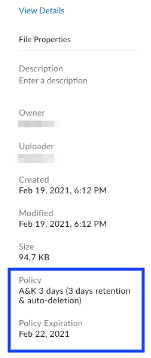
- If you move a file from a folder with a retention policy to a folder without a retention policy, the file is still governed under the initial retention policy.
- If you move a file carrying a retention policy to a folder with the same retention length, Box preserves the Time Period value and will evaluate the original Disposition Action when the file expires.
- If you move a file carrying a retention policy to a folder with a different retention length, the longer retention expiration date takes precedence over the shorter one.
- If you move a file carrying a retention policy with an indefinite retention length to a folder carrying a retention policy with a finite retention length, the file will be retained based on the date of the file move.
- You cannot transfer a file or folder with a retention policy outside of the enterprise. You also cannot change the folder owner to an external party, or move an individual file to a folder owned by an external user.
- If you copy a file under retention to another folder not associated with any retention, the copy is not retained.
- If you remove the custom metadata that is carrying a retention policy from a file, the file is still governed by the initial retention policy.
- If you update the custom metadata on a file to a new metadata value with the same retention length, Box preserves the Time Period value and will evaluate the original Disposition Action when the file expires.
- If you update the custom metadata on a file to a new metadata value with a different retention length the longer Time Period value takes precedence over the shorter one.
- If you change the Time Period from one finite value to another finite value (e.g. 3 years to 5 years), the file will be retained based on the upload date of the file to Box.
- If you change the Time Period from indefinite to a finite value, the file will be retained based on the date the Time Period was updated.
- You cannot transfer a file or folder with a retention policy outside of the enterprise. You also cannot change the folder owner to an external party, or move an individual file to a folder owned by an external user.
Event-Based Retention
Event-based retention allows Admins and Co-Admins to create policies where retention doesn’t start until a specified business event occurs. For example:- A company needs to ensure employee records do not get deleted accidentally or intentionally (i.e., retained “indefinitely”) throughout one’s employment; then retain for 3 years after the employee departure. In this scenario, employee departure is the business event.
- A pharmaceutical company needs to collaborate a research study with an external research firm. Per the contractual agreement, the study ends on a certain date, and content needs to be deleted right after that day. In this scenario, study end date is the business event.
Modifiable and Non-modifiable Retention
With Box Governance, you can create both non-modifiable and modifiable retention policies. Non-modifiable retention policies are designed to allow certain financial services customers to electronically store and retain records in a manner that complies with SEC Rule 17a-4. Once set, non-modifiable retention policies cannot be shortened in duration, and content under retention cannot be removed from active or inactive retention policies. Not all businesses that want to use retention policies need to comply with the stringent regulatory requirements of SEC Rule 17a-4. Modifiable retention policies allow customers to implement retention policies with the ability to modify them later. This will allow for both the creation and modification of policies, including shortening of retention policies, as well as making policy changes retroactively to content already under retention. The following table describes the difference between modifiable and non-modifiable retention policies.| Modifiable Retention Policy | Non-modifiable Retention Policy | |
|---|---|---|
| Designed for SEC Rule 17a-4(f)/FINRA compliance | ❌ | ✅ |
| Add folders | ✅ | ✅ |
| Remove folders | ✅ | ❌ |
| Add metadata | ✅ | ✅ |
| Remove metadata | ✅ | ❌ |
| Lengthen duration | ✅ | ✅ |
| Shorten duration | ✅ | ❌ |
| Convert policy | ✅ | ❌ |
| Retire policy | ✅ | ✅ |
| Delete policy | ✅ | ❌ |
| Change disposition action | ✅ | ✅ |
| Change notification | ✅ | ✅ |
Retention Policy Reporting
The Reports section of the Admin Console offers multiple reports on retention policies:- The Retention report contains information about a selected retention policy, along with a list of all of the files the policy covers.
- The Disposition report contains information about the disposition of content in your Box account affected by retention policies.
Files with Multiple Retention Polices
More than one retention policy can be applied to a file. In the case where multiple retention policies apply to a file, retention is maintained on the file until it reaches the end of the retention period with the latest date of all the policies applied to it. The policy with the latest retention period end date when multiple policies apply is sometimes referred to as the “winning” policy. For example, a file was created on January 1, 2022 and has no additional versions. It has the following retention policies that apply to it:- Policy 1: 1-year retention, applied to the file on January 10, 2022
- Policy 2: 6-month retention, applied to the file on February 1, 2022
- Policy 3: 2-month retention, applied to the file on December 1, 2022
Retention Policies and Legal Hold Policies
Files can be subject to both retention and legal hold policies. If a file is subject to a retention policy with a disposition action of Permanently Delete, and if the file is also subject to a legal hold policy when the retention period ends, it will not be deleted until the legal hold is lifted.How Retention Interacts with Trash
Users can delete retained files by sending them to the Trash. However, they cannot purge files from Trash until the files’ retention period has ended. Before that time, they can also restore files from Trash to their original location. If the original location has been deleted, they can choose a new folder in which to place the files after they have restored them. Additionally, below is the prioritization for content deletion (from highest precedence to lowest).- Legal Hold
- Trash (if set to either Nobody or Never Delete)
- Retention Policy (with Disposition Action = Permanently Delete Content)
- Trash (any other setting)
Content Deletion After Retention Period Expiration
When retention policies include an end-of-policy Disposition Action, content is queued for deletion after its retention period expires. While most files are deleted on the same day their retention period ends, actual deletion timeframes may vary and cannot be guaranteed. In certain cases, files may take up to 72 hours to be deleted, particularly when large volumes of content become eligible for deletion simultaneously. Additional scenarios where disposition timelines may be affected are:| Scenario | Result |
|---|---|
| Customer sandbox experiment with a one-day retention policy. | The disposition process may take up to 72 hours to take effect. |
| Shortening a modifiable retention policy from 180 days to 90 days. | |
| Setting an Event-Based Retention (EBR) policy start date to exactly three years ago (with a three-year retention period). | |
| Applying a three-year retention policy to a large folder (200K+ items). | The disposition process may take up to 72 hours to take effect. For content older than 3 years, complete deletion for all eligible items may take several days. |
Retention Examples
Here are a few customer examples for retention:- A company needs to retain employee records for 3 years after employee departure.
- A financial institution wants to manage their loan process through Box, retaining the final documents for 6 years for compliance requirements.
- A manufacturing company wants to share reports with vendors through Box, and these reports are only relevant for 30 days.
- Version 1 of a file has a 7-day retention period
- Version 2 is uploaded 3 days later
- At the global (entire enterprise) level (note this option is not retroactive)
- At the folder level
- To content with specific metadata
- When files are added or uploaded to Box
- On dates defined in or by file metadata (event-based retention)