

Adding text
To add a text box to your Canvas:- Click the text icon
 in the Canvas toolbar.
 - Click anywhere on the Canvas to place the text box.
- Enter text.
Editing
To edit the entered text, click on the text box.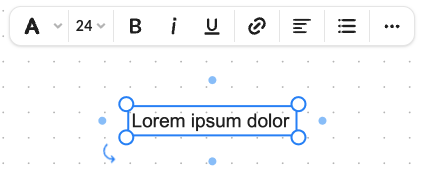
- font and highlight color,
- font size,
- font style,
- add hyperlink,
- change text alignment:
- vertical (align to top, middle, or bottom),
- horizontal (align to left, center, or right),
- create a bulleted or numbered list,
- more options: copy, send to front, send to back, delete.