

- in progress — the flow has been initiated — that is, the first trigger event has happened
- completed — all steps in a flow have completed and the final outcome has occurred
- stalled — the low has arrived at a step it cannot complete, such as a missing file, folder, or task assignee
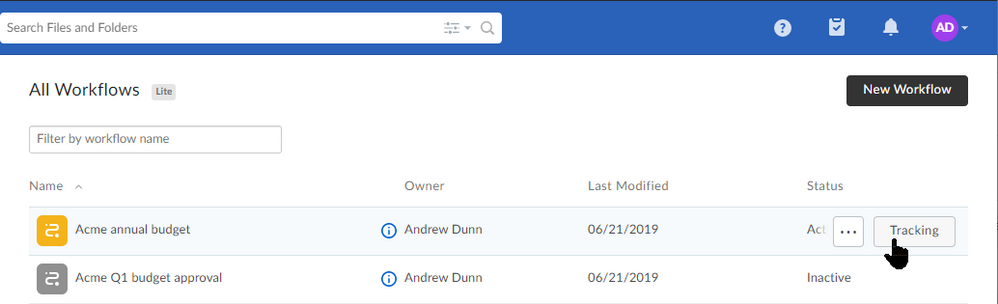
- Open Relay. From the Workflows page, to the right of the workflow you want, click Tracking.
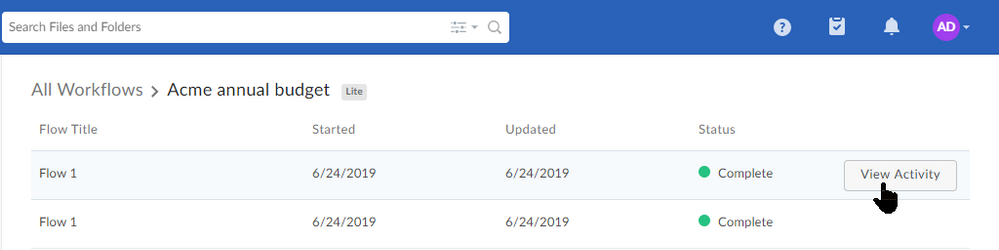
- Hover on the row of the workflow you want, and to the right of the Status column click View Activity. The Activity Report window opens.
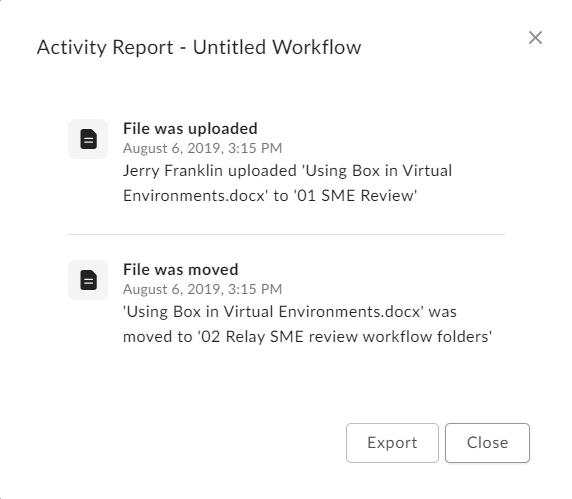
- From here you can view or download details of all of the workflow’s triggers and outcomes, including, where appropriate:
- who completed each action
- dates and times of completion
- what actions were taken at each step
- task type (general or approval) and disposition (completed, approved, or rejected)
- To download a .csv file of a workflow’s details, click Export.
- Relay downloads to your machine a .csv file with the details of each step, including the event (trigger, outcome, and so on), the event type (file upload, folder copy, and so on), a timestamp, and the specific content and people involved.