- @mentions in comments and file annotations
- collaboration invitations, and
- shared link announcements.
Note
- The Notification Center does not provide expiration notifications, but Box does send these notifications to you through email.
- The Notification Center does not support filtering of notifications.
Reviewing your notifications
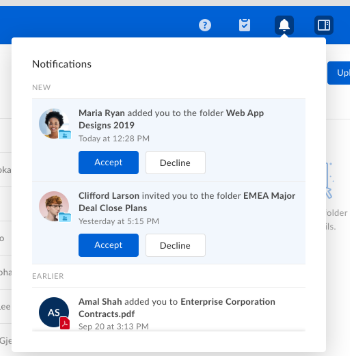
When you receive a notification, Box displays an alert message next to the Notification Center’s bell icon.The bell icon displays how many unread notifications you have. When you click the bell icon, Box refreshes this number.

- In the top-right corner of your Box account window, click the bell icon. Box displays
the Notifications Center window. - Hover in the Notifications Center window, and mouse scroll.
- To accept an invitation, hover on the invitation notice and click Accept.
- To open a file for which you’ve received a notification, click the notification. Box opens the file.
- If it’s an annotation, clicking the notifcation opens the file preview to the annotated section, regardless of where in the document it may be.