

This article is about Box Shuttle in the Admin Console. If you’re using legacy Box Shuttle, a standalone tool, see legacy migration guides.
- Download and register Windows Agent on your machine.
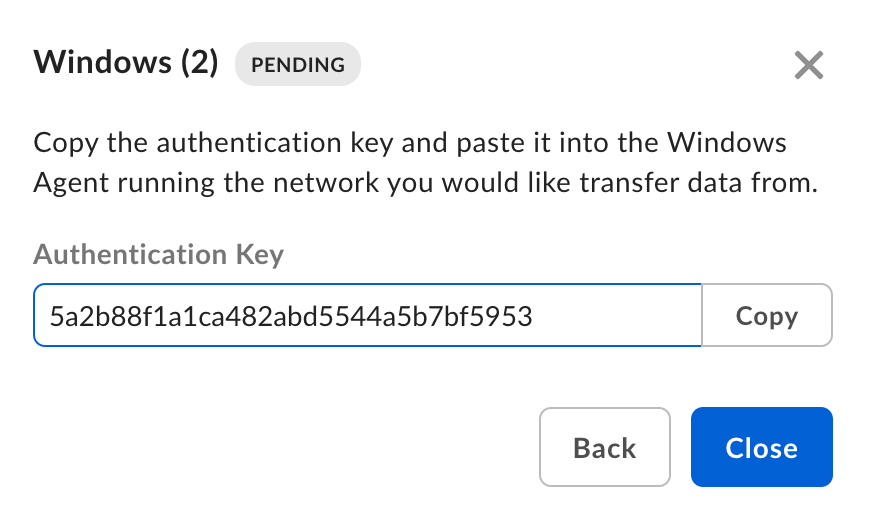
- Authenticate Box Shuttle using the provided key.
You can run Windows Agent in app mode or as a service. The service option is preferred because it will keep running after the Windows user logs out. For more information, see: Shuttle Windows Agent as a service.
Set up Windows Agent
System requirements
Windows Agent supports the following Windows versions:- Windows 8
- Windows 10
- Windows 11
- Windows Server 2012 R2/2016/2019/2022
| Number of cores | RAM | Disk space |
| 4 | 8 GB | 50GB |
For Windows machines that are running concurrent jobs, conservatively, it is recommended to run one job per 1.5 cores and 4 GB of RAM. In other words, an 8-core 16-GB machine can run 4 concurrent jobs, and an 8-core 32-GB machine can run 6 concurrent jobs.Larger jobs with more files or more complex permissions may require more than the minimum system requirements.
Download Windows Agent
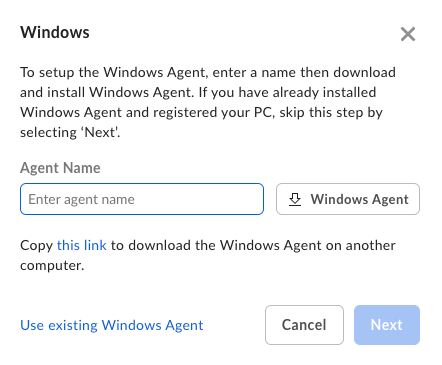
- In Shuttle, click New Job and provide a unique name for the analysis or migration job.
- Select Windows.
- Enter the Agent Name and click Next.
Register Windows Agent
- Install Windows Agent.
- In the pop-up window, provide the Agent Key you have copied before the installation and confirm. It may take some time to configure and register the Agent.
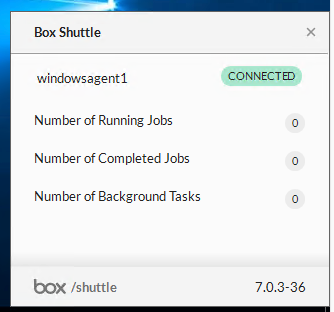
- Once the registration finishes, Windows Agent will appear as connected. You can now proceed with data analysis or migration.
Windows Agent must be able to connect to the Shuttle service and other Box services to correctly list and migrate data. This means that the network on which the Windows Agent is running must be configured to allow that traffic.
Windows migration specifics
Filtered files and folders
Box Shuttle automatically excludes files and folders that have the System or Hidden attribute. Important: If Shuttle filters a parent folder, it also filters everything inside that folder, even if the nested items don’t have these attributes. This behavior can’t be changed in Native Shuttle. Before you migrate: Check your source folders and remove the System or Hidden attribute from any folders you want to transfer.Renaming files and folders
Not all content management systems work the same. When it comes to folder names, here are the considerations for Box:- No two folders within the same parent can have the same name. For example, the “Magical Creatures” folder can have only one “Unicorn” folder.
- File and folder names cannot have leading spaces. So “ Narwhals” will need to be renamed to “Narwhals.”
- Folder names shouldn’t be longer than 100 characters.
- File paths shouldn’t be longer than 255 characters.
- Ensure that the folder name does not contain a backslash () or forward slash (/).