

Web Application
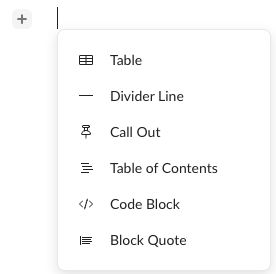
On the web application, you can insert a block quote in one of two ways: using the contextual menu or a key combination. To insert a block quote using the contextual menu:- Click where you want to insert the block quote. Box displays + to the left of your cursor.
- Click + and select Block Quote.
- Type or paste the quoted text.
- Click where you want to insert the block quote.
- On your keyboard, simultaneously press the > and space keys.
- Type or paste the quoted text.
Mobile Application
On your mobile device, you can insert a block quote by tapping the ”>” and space keys at the same time. To insert a block quote using the keypad:- Tap where you want to insert the block quote.
- On your keypad, simultaneously tap the > and space keys.
- Type or paste the quoted text.