

This article does not apply to you if:
- Your version of iOS is greater than 12.1, in which case the content on your Managed Apps is protected.
- Your enterprise does not use an MDM solution and Box for EMM on iOS.
- From the Admin Console, click Enterprise Settings.
- Click the Mobile tab.
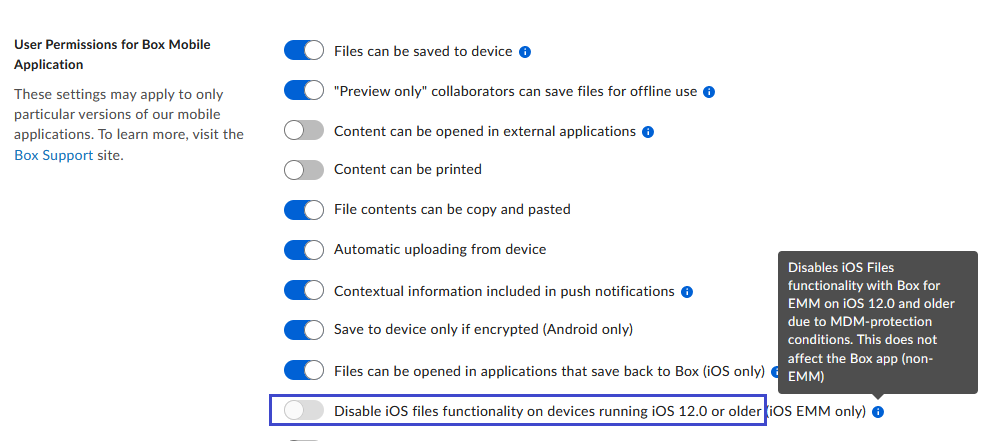
- In the User permissions for Box Mobile Application section, click the Disable iOS files functionality on devices running iOS 12.0 or older (iOS EMM only) slider button.
Note Disabling iOS Files app functionality can affect workflows.
| Workflow Example | If the slider is disabled… | If the slider is enabled… | Work-around |
| See Box files in the iOS Files app. | You are able to see managed files in the iOS Files app. | You are unable to see managed files in the iOS Files app. | None at this time. |
| Attach a Box file to an email through the iOS Mail email client. | You are able to attach a file through the iOS Sharesheet. | You are unable to attach a file through the iOS Sharesheet in Mail. | Use a shared-link instead of attaching a file. or Invite the user to a file as a collaborator whose permission you set. |
| Open an iWork file from Box in an iWork iOS app, such as Presentation, and so on. | You are able to open an iWork file in an iWork iOS App. | You are unable to open an iWork file in an iWork iOS App. | None at this time. |
- Customers of Box iOS EMM
- Enterprises with the “Allow Files to be into applications that save back to Box (iOS only)” enabled