

- Open your Admin Console.
- In the lefthand navigation, click Enterprise Settings. The Custom Setup page displays.
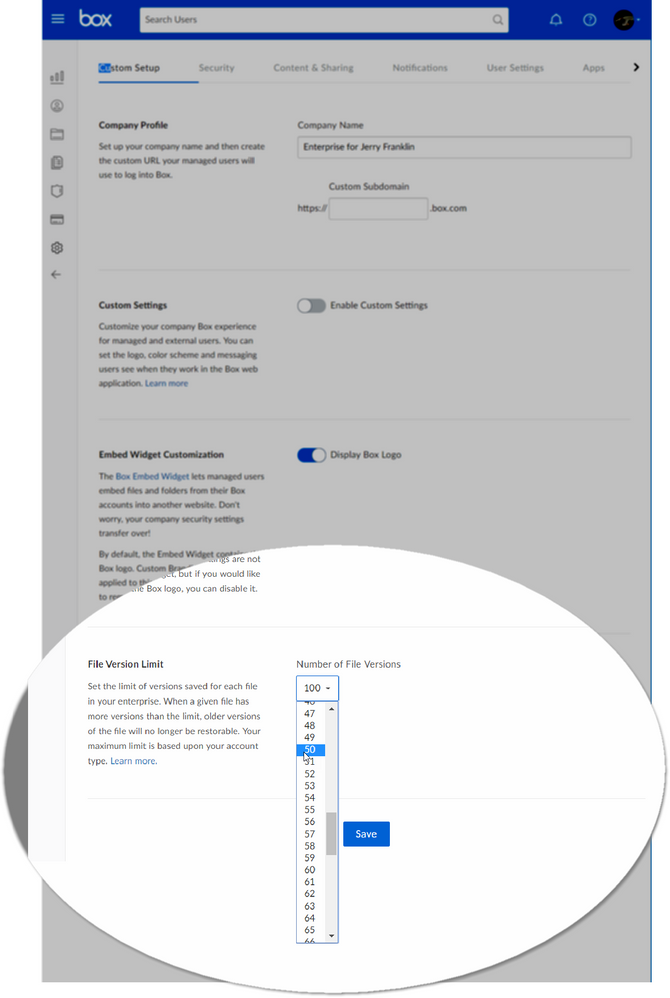
- Scroll down to the File Version Limit section.
-
In the Number of File Versions box, click the down arrow and select the number of previous versions of files you want Box to keep track of and make available.
-
The maximum number of file versions Box allows depends on the Box account type. By default, Box retains the maximum number of file versions allowed.
- Personal Free - Unavailable
- Personal Pro - 10 Versions
- Starter - 25 Versions
- Business/Business Plus - 50 Versions
- Enterprise - 100 Versions
- If your organization uses Box Governance, you also see an option to preserve an unlimited number of prior file versions. This option is active by default. If later you want to revert to saving a finite number of file versions, clear the Unlimited check box. The Number of File Versions list displays, and you can then select the number you want.
-
The maximum number of file versions Box allows depends on the Box account type. By default, Box retains the maximum number of file versions allowed.
- Click Save to save your changes.
- the current version
- the most recent prior version