

Understanding How Ransomware Impacts Box
Ransomware can only affect files via the Box Sync or Box Drive applications on a user’s computer. If Box Sync is enabled, only those files set to Sync will be affected. Ransomware cannot be spread through Box. Encrypted files may be synced to other users, but the ransomware cannot spread further within Box’s cloud storage as all files are encrypted at rest and do not have an executable environment to run from.Recovering from Ransomware
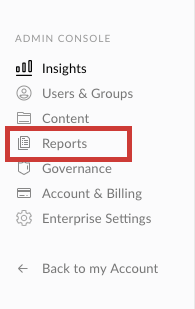
When a user’s machine is infected with ransomware, the encrypted content may sync up to Box if they are using Box Drive or Box Sync. If this happens, we have resources available that will assist you in recovering your content. Please contact Box Support for assistance as soon as possible or read below on how to use the Box API for self-remediation. If you have confirmed that a user’s system has been compromised we recommend that you quit Box Drive or Box Sync and ensure the malware is removed before taking any additional steps. To determine the scope of impact, an Admin can confirm which files were altered by running the User Activity report. To do this, navigate to the Admin Console > Reports (graph icon/reporting tab shown below) > User Activity > Create Report > User Activity
- Edit
- Moved to Trash
- Renamed
- Uploaded
Using the Box API for Remediation
If you have developer resources available, you can write a custom script that rolls back all infected files to an unaffected version using our API. The approach you take depends on how the particular strain behaved.Encryption In Place
If the infected files were changed “in place”, i.e. edits to the existing file, then you can use version history to restore affected files to a prior version. At a high level, your goal should be to:- Look at upload/modify from the impacted time frame (upload/modify events), and filter for actions done by the affected user. Since the endpoint does not allow for filtering by user as a parameter to the request, this filtering for a user must be done after the initial results are returned.
- From the affected file IDs returned, revert to the version whose modified date was most recent before having a new version uploaded.
- If the files were renamed, revert to the name of the previous version
- Get Enterprise Events: https://developer.box.com/reference/get-events/
- Get File Versions: https://developer.box.com/reference/get-files-id-versions-id/
- Promote Version: https://developer.box.com/reference/post-files-id-versions-current/
- Update File Info (rename): https://developer.box.com/reference/put-files-id/
Encryption + Deletion
If the malware’s behavior was to delete the original file and then upload/replace it with an encrypted version, then the goal should be to restore the original files from the trash on Box and delete the encrypted files.- Similar to step 1 above, identify the files uploaded and deleted by the affected user in the time frame.
- Verify the file is still in the trash (i.e. hasn’t been manually restored by the user)
- Recursively restore items from the trash
- If there is a name conflict, decide how you wish to handle the name conflict (rename/overwrite). Alternatively, you can delete the encrypted files from the beginning before restoring items from the trash.
- Get Enterprise Events: https://developer.box.com/reference/get-events/
- Get Trashed Item: https://developer.box.com/reference/get-folders-trash-items/
- Restore Item: https://developer.box.com/guides/trash/restore-file/
- Delete Item: https://developer.box.com/guides/trash/permanently-delete-file/
Recommendations & Limitations
- To expedite recovery, we recommend submitting the User Activity report, along with as much information as possible about the type of ransomware and what exactly took place, with your initial request
- In order to restore an encrypted file, a previous version must have existed on Box prior to the event.
- Some less common types of ransomware will delete content and replace it with completely new content. While we can recover deleted content, we’re unable to delete any new content. This can be done manually or by using our API. We recommend that any deletions are completed prior to content recovery.
- Box’s revision system is based on each individual file, versus a point in time, which does not currently allow for a point-in-time-based restoration. Instead, we can use native features of Box such as Trash and Version History to help restore files.