

Metadata Terminology:
- Attribute: a key-value pair
- Metadata Template: created by an admin; specifies a grouping of attributes that define what values can be populated for a file/folder
- Metadata Instance: created by any user; specific attribute values set for a file or folder. More colloquially called “Metadata” to users. This is what is created when a Metadata Template is applied to a file or folder.
When do I use custom Metadata vs. Metadata Templates?
Custom Metadata is best used for ad-hoc collaboration and one-off metadata additions, whereas Metadata Templates are best used for structured business processes. Both custom Metadata and Metadata Templates offer basic search functionality, but structured Metadata Templates offer more advanced capabilities around managing your content. Some of these include:- Enforce uniformity across metadata application on files
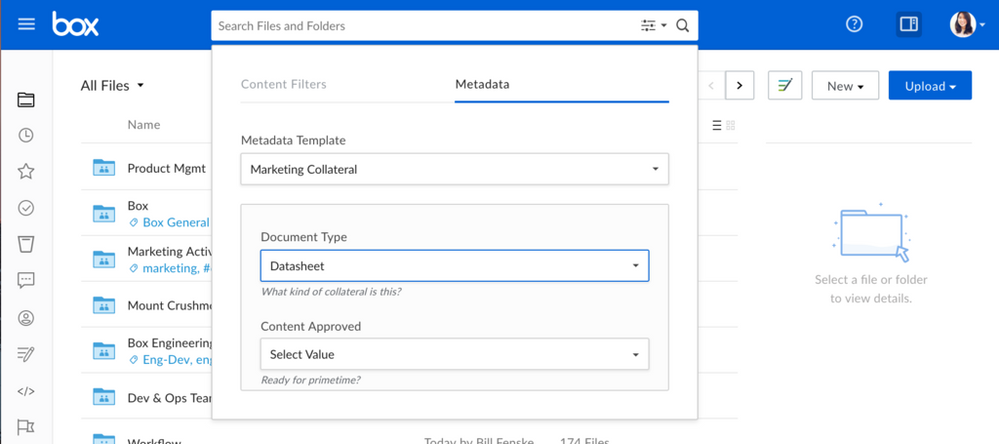
- Advanced search on specific metadata attribute values
- A SQL-like query API, which supports logical operators
What should I consider when creating a Metadata Template?
Templates are a logical grouping of Metadata attributes that help classify content. Templates should be used to group together similar attributes. For example, a marketing team, that is classifying brand assets, always needs to know the campaign name and the product line of an item. In this case, a good practice would be to create one “Brand Asset” template that has two attributes: “Campaign” and “Product Line”. In a case where all content in Box has a “reference ID”, and only a subset of that content is a “Brand Asset”, two separate Templates applied to one file may be a better approach.Here are the limits to also keep in mind as you create Metadata Templates for your enterprise:
| Maximum number of custom Templates per enterprise | 500 |
| Maximum number of fields per template | 250 |
| Maximum number of Templates that can be applied to a file/folder | 100 |
| Maximum number of custom Metadata attributes (non-Templates) | 256 |
| Maximum number of characters for keys and display names of Templates and attributes | 255 |
| Maximum Metadata size | 512KB |
| Recommended max Metadata attributes per template | 128 |
| Recommended max size of an attribute value | 2048 chars |
| Recommended max # values in a dropdown | 256 |
| Example max Metadata attributes per template | 5 |
| Example max # values in dropdown | 800 |
| Example max size of dropdown value | 50 |
| Example max Metadata attributes per template | 20 |
| Example max size of attribute value | 10,000 chars |
| Example max Metadata attributes per template | 400 |
| Example max size of attribute value | 500 chars |
What are some examples of Metadata Templates?
When using Metadata, it’s important to consider what functional groups will benefit from adding and maintaining Metadata Templates. Our suggestion is to consider using Metadata in the following lines of business:- Legal- Classifying legal contracts. From custom terms of service to acquisition contracts, Metadata attributes like signature date or contract term can prove useful for discovery.
- Vendor Management- Onboard and manage vendor contracts and details for much easier reporting and cost management.
- Sales- Organize content by product line, use case, or sales geography. Make it easier for sales representatives to find important collateral.
- Marketing- Manage digital assets and sales enablement material. Centralize multiple digital asset repositories to help streamline brand efforts.
- Project Management- Add structure and status to documents. Add detail to project work plans to help accelerate and communicate project progress.
- HR- Standardize the employee lifecycle, from hiring to retiring. Leverage Metadata to find common forms to analyzing employee data.